Interesting, I might play around with my settings accordingly and evaluate what is best for the Dream Air.
I seem to be getting 3DOF more frequently in low light conditions - while this shouldn’t be an issue for lighthouse tracking, and very rare to be an issue for the older headsets, it does seem to a thing for the Dream Air 
Hmmm, this is strange tho.
How do you place the lighthouse?
It’s straight in front of me and up on a shelf, angled downwards.
There’s not a huge distance between the LH and the headset, maybe one metre or so. To connect I hold it further back. However as mentioned, this has been fine for years with the 5k+ and 8KX.
I have an angled lamp to one side on my desk, and an ambient lamp next to it. Normally for gaming sessions I would use just the ambient lamp, which isn’t too bright. This ambient lamp (or no light at all for testing) doesn’t seem to be enough specifically for the Dream Air.
If I keep my angled lamp on, then it seems to track fine. As I had light bleed under my nose with my 8KX, I preferred to game with the angled lamp off and just the ambient light on. I don’t have any light bleed on the Dream Air so it’s fine to keep the main lamp on - but curious why it seems necessary.
1 Like
Some nice VR UI updates coming in the 4.8.1 patch: Spectrum - v7.116.5
I’m very new to the Pimax ecosystem, having used a Quest 3 for Star Citizen until my Pimax Dream Air Slam arrived recently.
One thing I’m unsure about is whether I should be using the Pimax OpenXR runtime or the Steam OpenXR runtime for Star Citizen. At the moment, the Pimax client seems locked to its own OpenXR runtime, as shown below, and I can’t see an option to switch it.
If anyone can clarify which runtime Star Citizen should be using with the Dream Air and how to change it if needed , I’d really appreciate it.
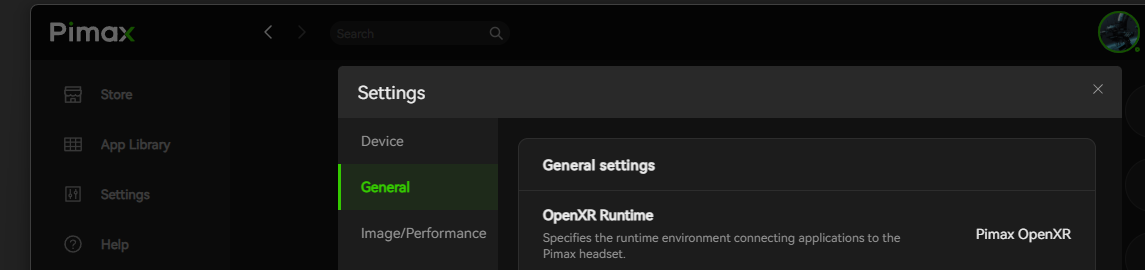
I’ve also noticed a significant drop in frame rate since moving from the Quest to the Dream Air. I’m assuming this is mainly due to the jump to 8K resolution — even a 5090 paired with a top‑end CPU is going to struggle with that kind of pixel load.
If anyone has recommendations on which settings I should adjust in the Pimax client, I’d really appreciate it. Alternatively, should I be focusing on tweaking Star Citizen’s in‑game settings instead?
Thanks in advance for any help.
Pimax OpenXR will give better and more consistent performance than the SteamVR runtime for now. You enable the Pimax one from Pi Play (which you already have running), and you enable the Steam one from within SteamVR. A change in one will be picked up by the other, no sync issues to worry about.
SteamVR virtual desktop (if you have controllers to enable it) is much more polished then Pimax virtual desktop, but Pimax’s one is still usable and can be handy to check Spectrum / Discord / browser etc while in VR. Steam’s one launches by a single press of the System button on a controller, Pimax’s one is by double tapping (and yes you can disable Steam’s one in its settings to avoid launching it, as this can cause SC to crash when Pimax is set to be the runtime).
Yes this headset will push your GPU, especially with SC being demanding already. I’m running 9800x3d, 5090, 64Gb and I run Pimax image Quality at 0.85 - note you must use the Games “Common Settings” profile for changes to work in SC, it can’t have a custom profile due to it’s Launcher and EAC anti-cheat.
I don’t run Pimax Smart Smoothing, as it causes artefacts in SC. I have enabled Quad Views (Performance), Pimax Central Priority Rendering (aka FFR, Performance) and Eyetracking to get DFR, although SC doesn’t support Quad Views yet and not sure if I’m getting much performance benefit. You can use head tracking (not eye tracking) to aim gimballed weapons and turrets, which can be fun with a little practice.
In game settings are a mix of Ultra / Very High. You can Google the FPS pros and cons - some settings have a marginal visual improvement with an FPS drop, and can be lowered. Don’t use Low quality settings, because in general these push things more to the CPU over GPU and performance can therefore often be worse. An SC quirk.
sboys3 has a Steam driver that makes the headset SteamVR native, and has a lot of options to play with. I haven’t tried it yet personally, but that is now another option. Martin from Pimax has a YT video about it:
Will this work with the SLAM version?
I can’t see which bit you’re replying to, but if you’re asking about the sboys3 driver, I’ve just had a look online and unfortunately it does not.
Currently it won’t work with SLAM version.
Thanks. Octofox
Please find my current settings below. I’m aiming for the best balance between strong visuals and a stable frame rate in Star Citizen, and hopefully this will help other Pimax Dream Air users running similar hardware.
I’ll keep updating this post as I make further tweaks or improvements.
Suggestions , recomendations for a better experience are hugely welcome (i’m a bit of a newbie with PC VR tweaking and optimisation) , but will incorporate any useful recommendations setting into this post as I go.
SPEC
W11 - /RTX 5090 (Nvidia 610.62) | 48G DDR5 (6000) AMD Ryzen 7 9800X3D
Star Citizen version 4.8.2 as @ 22-6-26.
Hedset Pimax Dream Air Slam (VPimax Play 2.01) Firmware V1.0.3
PIMAX CONFIG
Pimax Device Setting
IPD Adjustment 69.2 (subject to individule)
Eye Tracking On
Eye Tracking Data OSC Transmission Off
Brightness 100
Refresh Rate 90 Hz
General
OpenXR Runtime Pimax OpenXR
OpenXR API Layer Compaitable Layer On
Image Peformace (Rendering}
Image Quality Custom 80
QuadView Performance
GPU Upscaling None
Sharpeness 0.9
Lock Frame rate to half Refesh rate Off
Color channels All
FOV Normal
Hide hidden Mask Off
IPD Horrizontal Offset (Left 0 / Right 0)
Image Vertical Offset (Left 0 / Right 0)
Adapt for Vive Off.
Star Citizen Graphic Settings
Graphics
Renderer : Vulkan
Resolution : 5120 x 1440
Windows Mode : Borderless.
V-Sync : No
Upscaling : Quaility 66%
Upscaling Techniqie DLSS / DLAA
Upscaling Model Transformer
Overall quality : Very High
Object Detail : Very High
Object View Distance : High
Texture Quality : Very High
Detail Texture : High
Ground Textures : High
Texture Filtering : High
Screen Space Shadows : Very High
Cloud Quality : High
Gas Clouds : Low
Fog : Medium
Water Caustics : Low
Water Simulation : Very High
Shader Quality : Very High
Post Effecty : Very High
Video Comms : Very High
Visor Lens Aspect Ratio : 0
Field of View : 123
Gama : 46
Brightness : 58
Contract : 60
Motion Blur : No
Chromatic Aberration : 0
Film Grain : 0
Star Citizen In Game VR Settings.
VR Enabled : Yes
VR Theater mode : No
VR Theater mode Scale : 4.99
VR Theater mode Distance : 5.99
VR Automatic Switching : No
VR Interpupillary Distrance (IPD) Scale 1.0
VR Monitor Mirror Mode : Fill (Right Eye)
VR Mirror mode smoothing : 0.50
VR Actor Control Mode : Ground Look (stable image)
VR Actor Control Mode ADS Direct offset : No
VR FPS ADS Dominant Eye : Right Eye
VR Recentre on FPS ADS : Yes
VR Vehical HUD Projection Distance : 100
VR Visor & Lens Enabled : Yes
VR Depth of Field : No
VR Visor & Lens Aspect Modifer : 0
VR Visor Lens Scale : 35
VR Viisor Lens Distance : 75
VR Visor Lens Height : 38
VR UI Scale : 1.48
VR UI Distance : 1.89
VR UI Height : 94
VR Cursor Size : 1.00
VR Cursoer Sensitivity : 1.48
VR 3D cursor follow head : No
VR 3D Cursor use eye tracking : No
VR Mobi glass Distance : 50
2 Likes
Looks pretty good, not spotted anything immediate that should be changed. I’m sure others will have suggestions as well.
As you say, getting a happy balance of good visuals vs performance is key, and often about small tweaks eg can you reduce a quality setting somewhere and gain some FPS without an obvious visual drop.
And as you know, sometimes SC performance is just low regardless of settings. Patch update without optimisation, certain intensive locations, lots of players and their items clustered in one place etc etc
1 Like
Thanks! I’ll give it a try, and I’ll also see if I can provide any updates or improvements.
1 Like
Hi, I tried this game with crystal og. I had to update all and everything and got it working. Unfortunately after 2-3 succesful vr sessions there is no chance to start vr again. Does not trigger vr at all, not with openxr over pimax, steamvr, nor even with sboys3 driver.
I tested Star Citizen during the Free Fly event, but do others have this problem, and is it solvable? I am really interested in buying the game.
Some time ago they changed it so you have to enable VR under options in the launcher. it will tell you it are in VR mode under the lauch button when Vr mode are checked.
Thanks. Yes I thicked that option (vr), and it was shown in launcher “vr is on”. I even had a few succesful starts few days before. But after that not any more.
you can check the game.log with an text editor and look/seach for openXR HMD, it will give you a Clus to whay it do not catch your HMD… If the related text in game.log du not make sense to you you can try to copy it in to an AI than you will get an explanation… or use it to ask on the starcitizen forum/ issues counsel.
Thx. This time I am done with testing, as I am on vacation. But I will sure buy this game (starter pack) eventualy. Does quad views really works in SC? And is there any mod to have some “on foot” actions on vr controllers?
Try turning eye tracking off in openxr layers. I have had this issue and it worked for me.
1 Like