Coming from an 8KX, I chose the Super Micro-OLED because I didn’t want to lose too much FOV, but now I realise the FOV is essentially the same, if the same profile is used, and you get close to the lenses. So then the form factor wins out. But some questions if anyone can help:
Has anyone been able to wear glasses with the headset? I guess not, but I have small thin-framed ones and have never had any contact problem in the 5k+, 8KX, Quest 2, Pro, 3 etc. The pancake lenses and form factor will probably make it difficult, I assume.
I’m willing to buy inserts if absolutely needed, but I’d rather not because if my vision changes (and it is starting to do so more, in my 40s), then I have pay for new lenses in my glasses AND my inserts, maybe every year!
Headstrap - I’ve seen there’s a 2D one, with a 3D one and a hard strap one later. Can anyone confirm if I can wear headphones with any of these? I can do so fine with the 8KX. I guess if I wait for the hard strap (for headphones fit or DMAS I guess), I’m losing some of the light weight and form factor of the Dream Air, so I’m unsure how to proceed.
Once they come out with a new face cushion where they get the eyes closer, I think the FOV will increase. But as far as audio, I heard the one they have now is good, but not as good as the DMAS. So, it’s just a matter of time to get those.
Between the Micro-OLED optical modules, because they’re the same in both headsets. On the setup side, FOV is differentiated by the distortion profile set by Pimax, as well as lens-eye distance - seems like Dream Air could do with a thinner facepad.
Let’s hope we can choose profiles in future, Martin has talked about the possibility. Then we could choose to run the 116 FOV profile currently on the CS M-OLED (Dream Air current profile is 112), with slightly less binocular overlap.
8KX offers much wider FOV than any of these, including CS Ultrawide, up to 159. But with some significant compromises to do so.
IPD only goes to 60 mm because of the huge lenses, which isn’t enough for me. Appreciate this doesn’t affect everyone but means it’s slightly blurry for me straight ahead, which ofc is annoying. Most headsets go to 57-58 and I need that. 5K+ was fine. It was unusable for me until I used the 5k+ gasket, which is made it usable at least.
Small sweet spot, so when I glance around instead of moving my head, things blur even more
Some distortions on the periphery when glancing around
The rings of the Fresnel lenses can sometimes be seen on the periphery
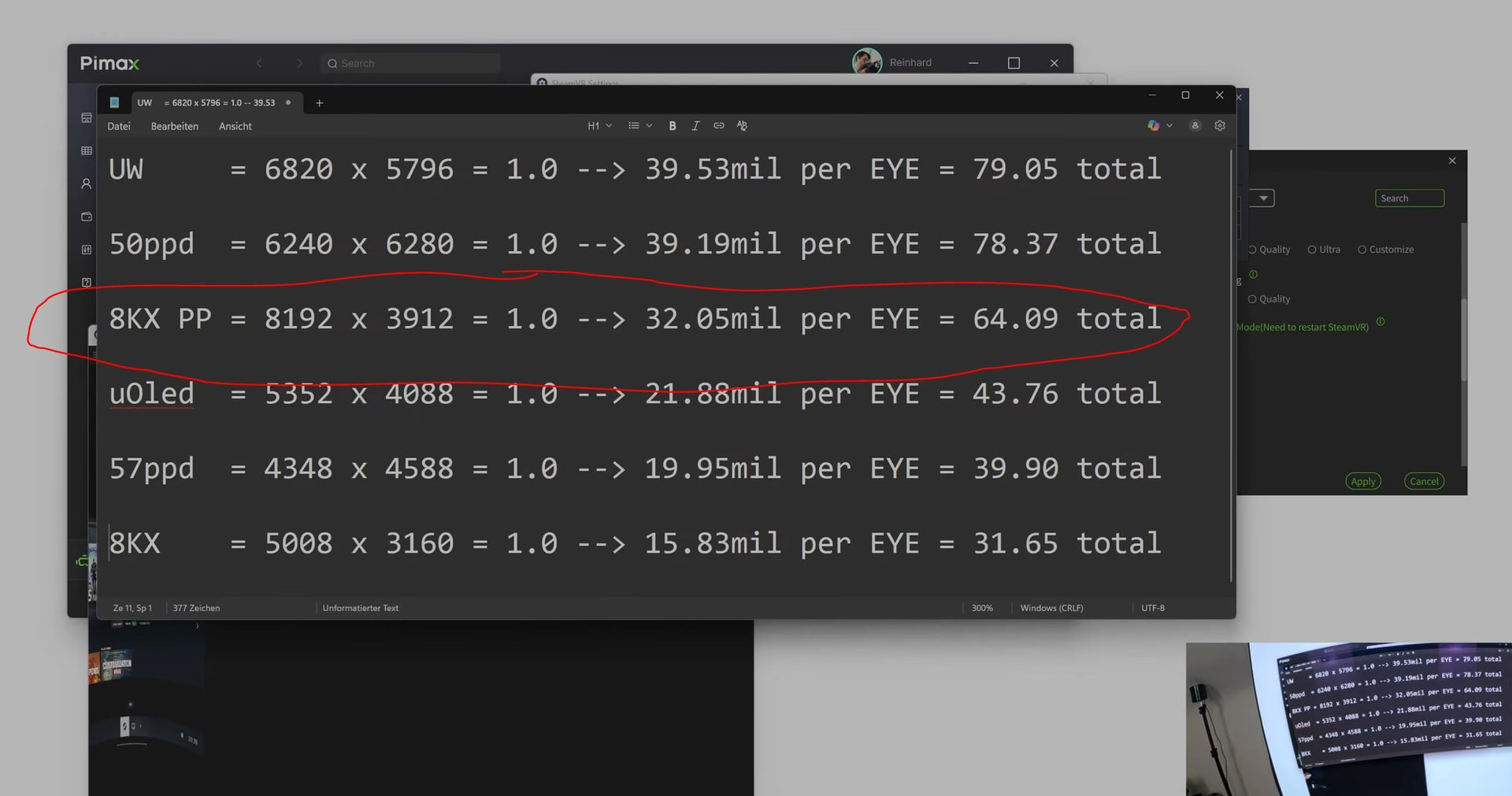
Parallel Projections requirement with huge GPU hit on some titles - this is the big one for me, I’ve had a 2080 Ti to run this headset since 2019, upgraded to a 5090 last week. Even with that, in SC at full quality, it’s using 99% of the GPU and 29-31Gb of VRAM
Relating to that, it’s very inefficient with its setup and needs to push a LOT of pixels in PP mode to correct for distortion - look how much it’s pushing compared to new gen headsets (and in SC, FPSVR tells me I’m actually running ~11460x5400 for some reason):
Binocular overlap is OK at around 82 depending on mode. Newer headsets are better or compare to MeganeX which is 96%. More 3D, less eyestrain. My eyes are pretty sensitive so I don’t think this is helping for longer sessions, I’m interested to compare on newer headsets and see if eye comfort increases.
Much as I love the FOV (159-170 wide is still one of the best out there for consumer headsets) and I’ve got it customised enough to be pretty comfortable, I think ultimately at this point I’d prefer more eye comfort with better overlap and more head comfort with less weight and inertia.
Good points. Though I don’t really notice the distortion, fresnel rings, or overlap. Maybe I just got used to them. Running a 5090 and gotta say that Fallout 4 VR is gobsmackingly beautiful. Just getting into Star Citizen and am impressed with the performance, though need to run at 60hz
I’ve been doing a bunch of tests with settings and I can’t get away from the CPU bottleneck. I’ve got a 13900KF and 65GB of 6400 DDR5 in dual 32 gb sticks but still my cpu timing struggles in busy areas. My GPU is a 5090. Are you seeing the same?
I’ve only got FPSVR to check VR metrics, but new CPU is 9800x3d and seems to be doing pretty well. GPU and CPU timing in SC is overall pretty high with quite a few spikes here and there. Just a lot going on in the game, and many areas still unoptimized, so I’m not too surprised. High player and ship counts in busy areas take a heavy toll because of the number of entities being streamed in - this has improved as static server meshing has distributed the server load, but we’re still waiting for dynamic meshing coming later this year.
With i9900k and 2080 Ti the load was a lot more obvious, but still playable on screen at 2560x1440.
Mmm, “Medium”? I’ll check the numbers next time I’m on. Bear in mind I’m mostly on one of the test environments not Live, not least because the latest build has a load of nice VR improvements
Pretty high atm ~30ms. Although I’m running default image quality in PiPlay (Auto, also tried Customize 1.38 and 1.0 )and 100% SteamVR, because it still feels smooth enough for me. I need to play with the settings more, I did drop things down, rechecked, and didn’t notice a meaningful improvement at the time.
Edit (as I can’t post it as another reply for some reason):
OK I adjusted PiPlay settings, and averaging 18ms on the CPU now, with better FPS.
Image Quality 0.85, Quad Views and Central Priority Rendering OFF (recommended by the looks of it, I had CPR ON).
Definitely feels smoother and better, but I can see slight pixellation on UI markers. I will stick with this for now as it feels like a good trade off.
And of course 18s is a very rough average, there are widely differing rendering situations in the game from cityscapes to mountainous regions to space, plus other factors like heavily populated player areas. The performance difference between internal and external view is quite noticeable atm as well both in FPS and ms response times, believed to be a Vulkan bug.
Hope that helps. For any more, we should continue on the SC thread.