Fixed some connection issues and settings not working properly under certain scenarios.
The FoV cropping? Not so soon buddy.
What happened to the “better cpu utilization” when using inside out tracking? Has that been implemented? And does it actually work?
I get exactly the same as you! 1.43.3s distortion profile on the UW is supposed to give better HFOV but it’s actually worse. Also the CA is much worse in the new profile. Very noticeable in the white lines on the F16 MFD if you look slightly off center.
Combined with the decrease in performance, I’m back to 1.43.1.
Definitely need a way to switch just the distortion profile.
I’ve included a comparison table which makes it obvious why there is such a performance hit.
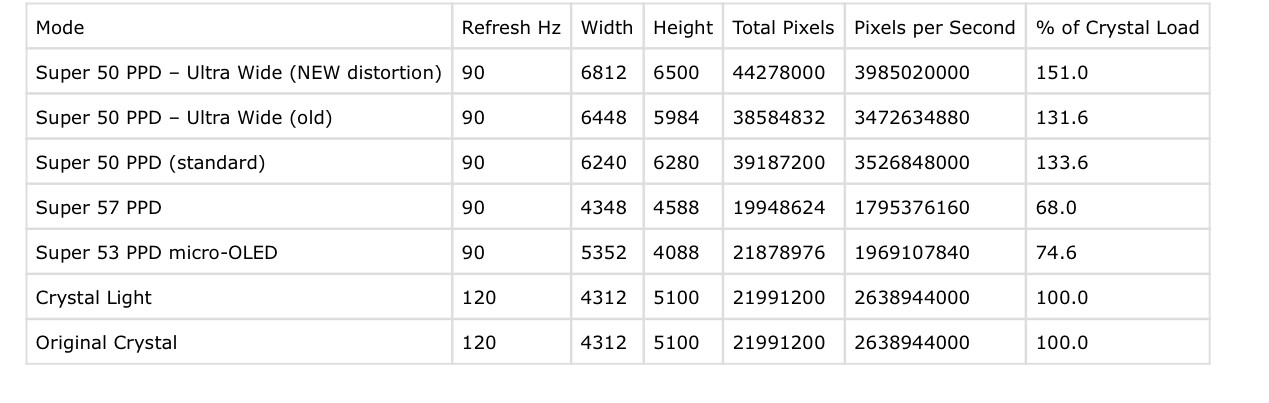
I see the increased resolution, but yeah, no increased FOV. Quite frankly, I don’t think we will since every profile that has tried has introduced unacceptable, eye strain inducing distortion…but I’ll still remain hopeful.
after installing the update and having a hard time, updating the Firmware (ad the end i had to pull the DP cable and it was able to go over 60%) i had a 2° bigger fov and after maxing out the IPD i got finally 130° with the Ice Silk Foam Facemask
Recognized my SUPER OLED as a Dream Air and the view is upside down.
micro-OLED?
Yes, this has been implemented. We’ve optimized the algorithm so it uses less CPU for tracking.
The engineers are still working on the profiles, aiming to strike a balance between FoV, distortion, and the CA issue.
If I’m not mistaken, the FoV in version 1.43.3 is rendered at around 132 or 134.
Same here, did you find a fix for this?
For me, this Version is unplayable unfortunately in DCS. Constant game freezes due to tracking problems and QuadViews area began flickering all the time as if with every eye blink it would make the image dark and light again. The last good version for me was 1.42.1.177. Not as good as the version when QV in PP was introduced but playable.
I tried PP V1.43.3 along with the firmware update on my Pimax Super 50ppd to v1.0.11. In Microsoft Flight Simulator 2024 I had very bad issues with headtracking, using the same settings as before the updates. Moving my head caused really bad stutter or maybe “rubber banding” or tearing, I’m not sure what to call it. This was using in-game eye tracking foveated rendering at .25. It does not show up in the monitor mirror or in video recording. Even though I was getting 60fps. I tried dropping the resolution down to low and it went away. It also went away when I turned off foveated rendering in the sim and used DLSS performance mode and full resolution.
I then uninstalled Pimax Play and all Pimax software and tried the new beta 2 Pimax Play. Again I had issues with image stability when turning my head getting massive stutter, even though my PC can run the sim at 60fps in full resolution. Turning off the Open XR Toolkit helped, but I still have issues with image problems around the foveated rectangle. It seems both the newer versions of Pimax Play and the new headset firmware are causing problems. I will revert to v 1.43.1 to see if that works better with the new headset firmware. For now I think the Toolkit is definitely causing problems when foveated rendering is on in MSFS 2024 (the Toolkit menu was flashing as well). 
Win 11, 581.94 nVidia driver, Ryzen 5800x3D, RTX 4090, 64 GB RAM.
But have you tried the 1.43.3?
Did you submit to the form?
Please keep me posted.
Hopefully going forward it will be possible to select distortion profile independently of Pimax Play Version. The new distortion profile for the UW in 1.43.3 is a major downgrade in DCS for me.
No increase in HFOV, big increase in CA & big performance hit.
Read my latest post in the PP beta 2 thread. In short I had an hour long flight just now in MSFS 2024 and all the issues I had previously have gone. Everything worked perfectly; the headtracking was smooth as silk. It’s night here now, so maybe it was my room lighting during the day. I’ll do more testing tomorrow to see if that is causing problems for me.
1 Like
I’ll submit this request to the dev team and, at the same time, ask whether users can replace the current profile with the old one.
1 Like
Super pour vos mises à jour ça fait plaisir ! mais il y a toujours le problème quand on active le sharpness ces espèces de vagues ou Ondes oscillantes je ne sais pas comment décrire le problème
Cela se voit énormément (exemple : missions immédiates air to air en Afghanistan ou la terre est légèrement noir ou quand il y a de l’eau style lac , mer , ect ect en fait sur des fonds unis
c’est vraiment gênant la seul solution pour moi c’est de ne pas en mettre GRRRRR
j’ai une 5090 -i913900k -64Go de Ram et le Pimax crystal super 50ppd enfin tout se qu’il faut pour être confort par contre pas de soucis avec Microsoft flight 2024 ça fait plusieurs fois que je le dit mais toujours pas de réponses …………
Super pour vos mises à jour ça fait plaisir ! mais il y a toujours le problème quand on active le sharpness ces espèces de vagues ou Ondes oscillantes je ne sais pas comment décrire le problème
Cela se voit énormément (exemple : missions immédiates air to air en Afghanistan ou la terre est légèrement noir ou quand il y a de l’eau style lac , mer , ect ect en fait sur des fonds unis
c’est vraiment gênant la seul solution pour moi c’est de ne pas en mettre GRRRRR
j’ai une 5090 -i913900k -64Go de Ram et le Pimax crystal super 50ppd enfin tout se qu’il faut pour être confort par contre pas de soucis avec Microsoft flight 2024 ça fait plusieurs fois que je le dit mais toujours pas de réponses …………