Yup, I see the increased res too (and the view does come across a bit sharper/clearer for it). I don’t see any reason to revert though as its easy enough to just reduce the resolution as needed (which I do on almost a game-by-game basis anyway).
Not for me, I got the exact same FOV with both. Measured it to 134\110 in both, not a single degree more. No idea what’s up with this profile but I’m sticking with 1.43.1. They really have to include several profiles to chose from with the client as it is clear that different users has way different results.
Same as for me then, however I can’t see any sharpness increase. Anyway, it’s no way I’m sacrificing 15% performance for no\marginal gains. My 5090 is already struggling as is. The image quality of the Super also degrades quite fast when starting to down sample it. Anything below 90% and my PCL is sharper.
Just lower it to the resolution it was before and it should be just as clear as before.
Regarding Martin’s profiles, I don’t have them, and we also haven’t conducted tests on those profiles yet.
The profiles I shared—either as internal builds or those already implemented in the client—were tested by the developers.
Let me double-check with the dev team whether the earlier internal profiles have been merged into version 1.43.3.
2 Likes
Hi, i remember a previous comment, on how the version after 1.43.1 (which would be this version now) will be getting the new original pimax crystal firmware, to do wireless streaming over WIFI, after downloading through the link you provided, there is no update to my headset, has this plan been changed, or do i need to wait for 1.43.3 to be fully rolled out in the automatic updates, thank you
Do you mean the Wi-Fi streaming patch for the OG Crystal?
Based on the development schedule, it should only be available by the end of December.
yes that is what i mean, thank you for clarifying
1 Like
No worries man.
Have a great weeked.
I am unable to click on quad views to turn it off or change the settings, it’s stuck on balance and is very slightly greyed out - just me?
edit - I’m dumb, My OpenXR runtime was still set to steam from when I was trying out star citizen (EAC moans about pvr lib)… changed that back to pimax and now the option is available.
2 Likes
I had the same issue and since I was just posting before you corrected, just the pics in case anybody else searches for it:
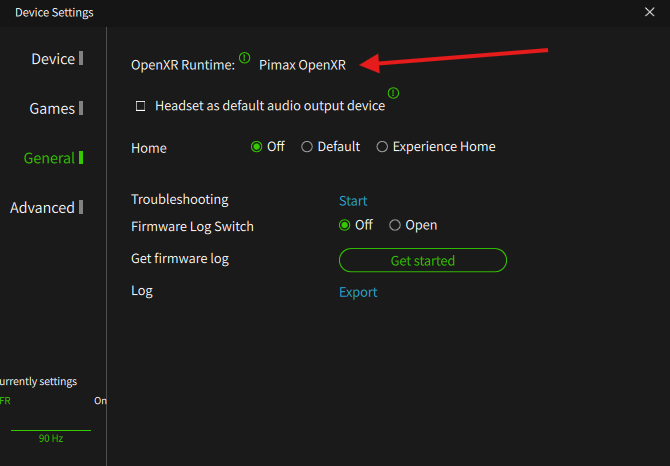
Then you should have (old tools removed for quad view, just pimax play now):
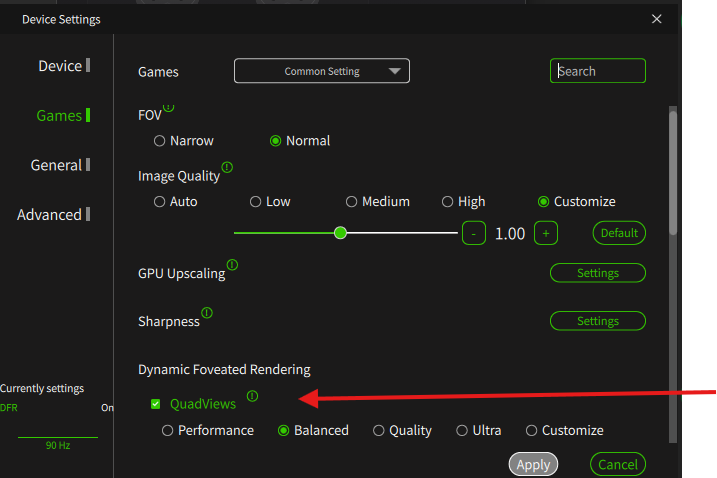
1 Like
Updated headset firmware to v1.0.11, is that because ultrawide?
The parameters for custom quad views seem very unintuitive though, 1.0 doesn’t seem to correlate to 100% but a significant super sample… what’s going on there?
I gave it another go, went back and forth between the 43.1 and .3 multiple times. Yes, .3 is a bit sharper at 1.0x, equals ~1.05 render scale on 43.1 I would say. However, reducing the render scale to 0.94 which is roughly equivalent to 43.1 at 1.0 introduces a slight blur to the image. It’s subtle, but for me it looks worse. The ratio is not the same between the two profiles either. When matching the resolution by render scale so they are ~1:1 total res, 43.3 has slightly less pixels across horizontal FOV (about ~200), but more vertically. In the end, it’s not night and day difference though, but I do prefer 43.1 as it looks sharper to my eyes compared to 43.3 at 0.94x. I measured the FOV again also (with wimFOV), but the results are exactly the same, actually 1-2 degrees less on the 43.3, but that might just be within margin of error. It’s a manual test after all…
Thank you for the feedback.
1 Like
Nope, it will be applied to all Super models.
That means they included the new distortion profile 6812x6500. I’m not a fan. I actually get more CA in the new profile in DCS than I did with the old and the performance hit is noticeable. I don’t get any increase in HFOV. I’m @120
If you want to compare CA try and put focus on the Left F16 MFD and focus on the white border lines. See how far of center you have to be to get the line split. Happens almost instantly with the new profile.
I have the Super 50ppd, way better tracking with this update. But still some glitching when moving around head in DCS. Going to try the qr codes also and see if they wipe the problem away. And also this quadviews boxes is noticeable sometimes , have SSAO turned off. Maybe there is a setting i have missed.
1 Like
As a side note for the next update. Will there be cropping implemented ? I thought it was supposed to be included in this one. During testing with WIMFOV, when the white flashing triangle moves out of sight, I can still see white glare in my peripheral, which to me indicates that the HMD still renders part of the triangle that I cant see as it’s outside my physical view, which is a waste of resources…
2 Likes
Crystal Light Firmware V1.0.19:
- Fixed several known issues.
¿what issues?