Pimax Play 1.43.9
Download link: https://dlappstore.pimax.com/release/play/PimaxPlaySetup_Release_ToC_V1.43.9.272_202604031542.exe
Release Notes:
I. New Features and Improvements:
- Optimised screen-off logic.
II. Fixed Issues:
-
Fixed an eye-tracking calibration issue on Dream Air and Crystal Super Micro-OLED.
-
Resolved controller vibration bug in Lighthouse mode.
-
Fixed headset disconnections triggered by service errors.
III. Rollout Plan:
- This version will be gradually rolled out to all users over the next two weeks.
更新日志:
一、新增功能与优化:
二、修复问题:
三、推送方式:
Are these fixes implemented in 2.0?
Thanks
Nope, these aren’t implemented in Pimax Play 2.0.
1 Like
Ok Thanks - so better to use 1.43.9 for the Dream Air I guess?
Calibration worked on my pimax crystal super oled. And it works in DCS. But with glitches, it seems the eye tracking turns on and off a couple of times within a second now and then, so the image quality is unstable in DCS.
I can confirm I had issues with eye calibration and it is solved with this release.
But the best is not this, the best is that is seems to have solved issues with motion smoothing.
Motion smoothing was already working quite well but I had quite a few artefacts, in some case quite bad like for example with UEVR and Returnal, but also with most games. That’s what was preventing me from using 90 FPS on the device with motion smoothing and locked at half rate. Now this is my default settings. This version has almost no artefacts and the performance boost is amazing, with almost no degradation in visual quality. I am running now almost all my games like that, which enables me to go almost native everywhere. Even cyberpunk 2077 works well with 90 FPS in addition with Luke Ross AER (resolution above 5000 X 5000 / with DLSS). Also Flight Simulator seems to have less visual glitches and almost no stuttering (but that might be because I’m testing the Sim Update 5 beta…
Was improving smart smoothing really part of the release or did the update just solved issues with my system by accident???
Forgot to say: I have a Pimax Super mOLED coupled with an RTX 5090
I am confused, why two different versions 1.43.9 and 2.0? I thought we’re done with 1.43.x?
The update solved one issue but I’m not sure if it created a whole host of other problems with mOLED. Random eye tracking failure, where it just does not track, even though its connected. And its still very hit or miss with its accuracy. At times I have to blink for it register that I’m looking at the top dot. Also the wear reminder does not work anymore.
I’ll try re-installing 1.43.9 but I’m not sure what the issues are.
1 Like
Have you checked that eye tracking is enabled? It was disabled in my case after the update and I had to re-enable it.
Yes. As this patch has fixed the eye-tracking calibration problem.
Are you using v1.43.9?
When the eye tracking dropped, did you hear any USB disconnect sound?
That’s strange—we haven’t made any changes to Smart Smoothing yet.
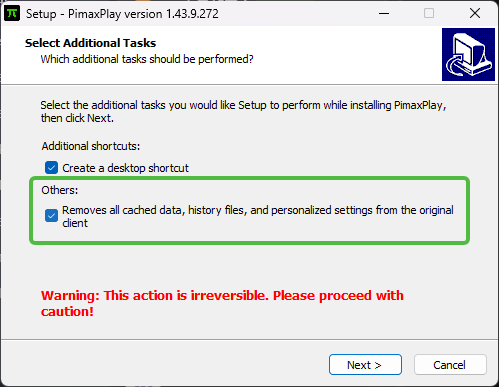
When reinstalling, please make sure this option is checked.
This is a hotfix for the eye-tracking calibration problem.
I always do that, but I’m starting to think something else is going on with the mOLED module.
I’ve had the screens shutoff randomly and then I wait for them to restart, while my game is still connected. I’m also getting random screen flickering, white boxes/noise popping up?
Is it entering a scene where colored boxes pop up, or is it just a completely black screen?
If it’s entirely black, the headset may not be detecting any movement and could be entering screen-off mode.
Is the screen flickering on both sides, or only on one side?
The screen shutting off happened a couple times, once loading into iRacing, second time was just about to pull out of the pits.
As for the flickering white boxes/rectangles/strips, it’s pretty random, I’ll have to check if it’s one eye or both.
I’ll try reseating the DP cable at the headset as well.
1 Like
I recently tuned my DDR5 RAM timings and I switched to UCLK=MEMCLK (my processor is an 9800X3D). I think that reduced micro stutters and maybe that’s the explanation for my perception of improved smart smoothing.
Do you have any plans to improve smart smoothing further?
(I still have some artefacts, for example you can see some squiggly lines when in “Steam VR void”, or some jitters in MSFS 2024 menus).
Yes, please try reseating the DP cable and also test with different USB and DP ports.