Eye Tracking Poll

Dear all,

A new poll will be launched to ask users who have the Eye Tracking module about their level of success. If you have an Eye Tracking module please let us know your experience with it in the poll so we can further improve it.

Eye Tracking Module Satisfaction Level
  • Satisfied
  • OK
  • Dissatisfied

0 voters

Were you able to successfully complete the Eye Tracking Initial Setup and Calibration?
  • Yes
  • No

0 voters

Is the speed and accuracy of tracking your eye sufficeintly fast and accurate?
  • Fast Tracking
  • Tracking but with lag
  • It cannot successfully track my eyes

0 voters

For those who are able to setup/install what has your success level with DFR been?
  • Works well for games that support it
  • Provides some benefit for some games
  • Has not provided any benefit to me
  • Have not been able to get it operational at all

0 voters

In addition, we have an upcoming special announcement for Eye Tracking module owners that may benefit quite a few. Stay tuned for this.

Thank you.
Your Pimax Team.

6 Likes

To provide more context for my voting, eye tracking used to work although it was very slow and gave visible banding on the rendered image when using dfr. After some updates it started crashing every time I ran calibration. 2080ti, 3700x, win 10, 5k+.

3 Likes

I feel like my experience would need more context too.
I don’t have tools to actually tell when it’s working or not.
Calibration stops working in first few steps 95% of the time if it launches at all.
3080 FE, 5900x win 10, 5K

1 Like

It seems that I have to make very strong/overly pronounced eye movements for the tracker to recognize a gaze change. So when using DFR, often my eyes e.g. slowly return to the center and the area right in front of me is still blurry.

Also, there was always a corner of the calibration where tracking was off (e.g. lower right area).

Installation is HIGHLY fiddly. One or both modules often move/come lose when re-plugging the face cushion. On an attempt to re-seat the right module while the face cushion was still on, I broke of one of the plastic pins holding the module in place. Horrible (!) experience.

I also had to re-do the whole process every time I turned my computer back on. The eye tracking USB module would only get detected when I plugged in the USB while the headset was on. Take apart the headset every time I want to use it? No, sorry.

Finally, after going back to regular FFR operations with unplugged/unmounted USB module, the Pitool software seemed to think eye tracking was still enabled. I regularly encountered blurry areas on the screen and could not do anything about it. Pitool showed FFR ā€œcorrectlyā€ (maybe incorrectly?).

Honestly, I had a really bad user experience. The Pimax 5k+ turned out quite a good headset at the end. But the eye tracking part was so not worth it, sorry to say.

3 Likes

There should be more questions. Are you happy with Pimax eye tracking support? (No, I am not). With 7invensum? (No, I’m not). I have sent them the issues and at the moment, no solution.
I’m thinking of unistalling the eyetracking from my 8kx because at the moment it is worse than better. Too much lag so I prefer for now FFR.
Keep pushing this gadget.

2 Likes

To be clear, I wasn’t able to get mine working at all because it kept falling off before I could put the headset on. If the mounting is so flimsy, I have no interest in using it in any serious application, as it’s likely to fall off while in use.

The magnets are far too weak to keep it mounted to the metal pegs adhered to the lens. I never quite got the courage to attempt to permanently mount the device to the lens via some sort of glue.

2 Likes

The only ā€œissueā€ I have with the eye tracking module is the latency which limits the experience a lot as this means I often look at the blurry perimeter before the crisp center moves.

Calibration and tracking is otherwise fine.

Oh and another slight trade-off is that the lenses on the eye tracking unit introduces glare which the Pimax headset lenses didn’t really suffer from IMO.

I have gotten used to it, but it’s a shame.

If the responsiveness of the tracking was better it would make for a lot better experience.

2 Likes

Connected to the headset using a short USB 3 cable (not the one provided)… :wink:

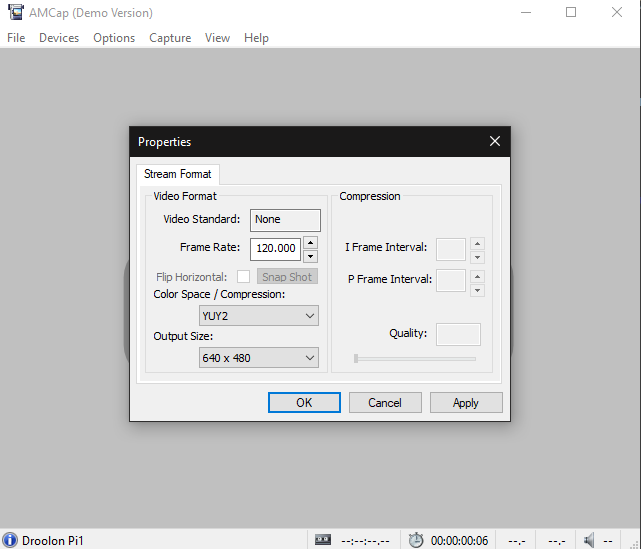
It’s been a long time, but when I tested it in the AMCap software there were no difference between running it connected like that and though a dedicated USB 3 cable so I of course opted for the ā€œcleanerā€ version.

Didn’t know there were any settings to be made/changed in the software?

it would be easier for everyone if somebody from the salespeople would really help out. everything that has been said and written about eyetracker, firmware, software is, from my point of view, to be described as misleading at best.

1 Like

I’ll try it out. Thanks… :+1:

1 Like

OK, so I just checked and I was using the (Pimax) supplied cable which is not capable of running 640x480@120Hz, but I am able to using a 3rd party cable and a 90 degree angle adapter I bought to try it out a while back. A cable that is indeed connected to the headset’s USB-C port and not directly to the PC.

Not quite sure why I went back to the original cable, but I believe it was (as mentioned) because there weren’t any difference for me at that time (both could only reach 60Hz on 640x480).

I never thought that AMCap made any changes to the eye module or 7invensun config, but only looked at it as a 3rd party tool to test the framerate of the module.

I’ll give it a spin to see if I can spot any difference.

EDIT

OK, that worked wonders! :slight_smile:

I had to double-check that I was actually using aggressive DFR when trying it in SkyrimVR.

I can see the borders/outer rings if I’m looking for them but it’s nowhere near what I’ve experienced before (which makes sense if they move fast enough for You to not be focusing on them and it seems like they do for me now).

Just to make absolutely sure I tried with aggressive DFR on and completely off and don’t think I would notice the difference when being immersed (and not checking for it), but the latency went from 7.7-8.0 ms (aggressive) to ~10-13ms (off) same place/scene/savegame just standing there turning around… :+1:

I need to update my replies in the poll it seems… :slight_smile:

Disclaimer: Not sure how/why it works if it’s not supposed to work when connected to the USB-C port on the headset but it does as You can tell by the screenshots.

This is the cable and 90 angle adapter I’m using and it’s not perfectly flush (it’s a tad too long like a few cm) it’s not in the way:

https://www.aliexpress.com/item/4000480900010.html?spm=a2g0s.9042311.0.0.27424c4dktHjJv

https://www.aliexpress.com/item/32955539826.html?spm=a2g0s.9042311.0.0.27424c4dktHjJv

EDIT - 2021-08-14: Ended up using this cable instead as it looks/fits nicer without the adapter (ā€œleft/rightā€/30cm):
https://a.aliexpress.com/_mMityVz

I don’t see why other good USB 3.x cables shouldn’t work too (especially at that short length).

The official guide is here (difference being that suggests a dedicated eye-tracking to PC USB 3 cable):
https://community.openmr.ai/t/usb-3-0-eye-tracking-module-setup/30514

BTW - Not sure where the guide that’s mentioned is:

EDIT:

Maybe this is it?

https://support.pimax.com/en/support/solutions/articles/60000676699-eye-tracking-manual

There’s a .docx attached.

3 Likes

What latency are you talking of and how do you measure it?

1 Like

GPU Frametime in fpsVR as far as I remember.

So the frame times were shorter with DFR on?

1 Like

Jup… :+1::upside_down_face:

Yes, I also noticed this. You basically get a higher possible frame rate due to lower GPU load. No wonders as part of the scene is rendered in lower quality.

If only the experience wasn’t so bad overall. I went back to FFR. I can just forget that this is enabled due to how little it compromises my experience. With DFR I could not.

1 Like

That’s exactly the idea with Foveated Rendering.

With the ET module running at 120 Hz I feel the opposite way.

FFR is a lot more distracting than DFR to me as I can always see the rings.

As mentioned I have to look for it to notice that there are areas that are not clear now (which makes sense if/when the tracking moves fast enough).

1 Like

No, I know. I just wanted to understand what you are getting at with latency. And I wanted to clarify that frame time is not latency, although often related to to some extent. In this specific case there is latency of translation and rotation of the headset and of the controllers, also of grip gestures and button presses, and of course then the latency of the eye tracking ā€œinputā€, which I felt was more in the order of multiple hundreds of milliseconds. This was one reason why I could not ā€œunseeā€ the sharp area lagging behind.

1 Like

Guys, what is the current status for somebody who hasnā€˜t really followed it in the past year: if I have the ET module and an 8KX.
How well or not does the mounting in the headset work by now, how finnicky is it, how stable once mounted ?
How reliable and simple is the calibration, which I understand is required every single time you use the headset ?
And, the million dollar question - once every of these hurdles is overcome: how well does DFR work (looking at the last posts above DrWilken seems to be quite pleased while PeterParker isnā€˜t).
And, here comes the two million dollar question: which apps, games are supported ?

3 Likes

Ah, I see… :+1::upside_down_face:

I felt the same way when running 60Hz, but on 120Hz I feel like it’s fast enough.