I have been going through numerous YouTube tutorial videos and I just can’t seem to get my Pimax Crystal Super VR to look and perform great in MSFS2024. I can get some things close. Resolution quality, but often times I am left feeling like I am missing those magic tip parameters that can take my experience to the next level.
I’ve gone step-by-step in several setup tutorials on YT and somethings have helped, but other things have completely made the VR unwatchable with FPS dropping to dang near zero, stutter galore and all kinds of visual elements that screams GPU overload.
I’m not expecting the magic pill but I would love a simple list of, say, in PimaxPlay settings make sure this IS or IS NOT turned on, etc. Same with MSFS2024 VR settings if anyone is adept with that program.
My gratitude would be immense for any real help. I’ve spent a boatload of money between the Pimax Super and new gaming machine. It seems crazy that I can’t simply enjoy flying in MSFS2024 in VR mode.
I would be happy to offer any additional system info. Thank you so much in advance for any real help!
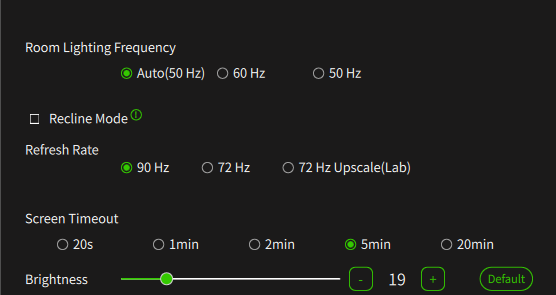
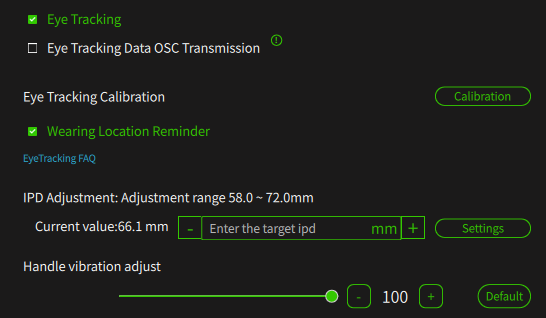
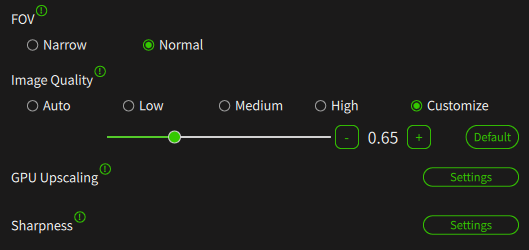
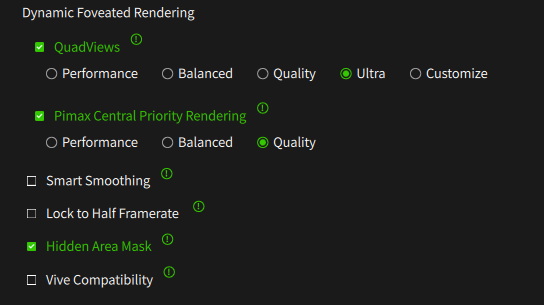
So since you are also using an Pimax Crystal Super and having a 5080, I will share with you my Setup, please don´t forget I play with it one of the most unoptimized VR games, so it can still be that you can setup the Image Quality maybe Higher, but I would recommend my settings, since its the best between graphic and VRAM usage, I also play other games and in each of it looks great.
Also I am using an Ultrawide, can be that you can go a bit higher if you using an 50ppd or 57ppd module
Upscaling is off since it gave me wierd effects in Steam VR and no boost at all and Sharpness isn´t played with
I went ahead and used your settings. Overall, it is a nice improvement so thank you! I did tweak some values for quality but I am still getting a bit of a blurry overall look and feel. If I focus down the runway it’s fairly blurry. Not anything major but it makes my eyes squint a bit. I wonder what setting would most affect that? I do not have GPU Upscaling on so I am using the sharpness feature at 1.7.
Still seeing that dang GPU warning pop up. Image Quality is set to 0.85. If I reduce that I’m worried it will be even more blurry…
Don´t worry either the Ultra as also the 50PPD are the same, only the Ultrawide has some changes in the position of the screens as far as I know, to reach more FOV (doesn´t work for me), I am not using the Sharpness Feature while its overloads your GPU easily if you are in heavy load games
May I ask did you set up your IPD your own or have you let your IPD checked by an Expert, had this Blurryness also but after getting my IPD Checked and entering it in the Tool i was gone, maybe if you use auto IPD, your IPD was miss measured, can happen.
Also don´t forget some Blurryness on the corners, can happen now, while the Rendering now simulates your Focused View and doesn´t render with the same resolution the corners to save Power of your Graphics Card
I had similar problems with my PCL. The image just didn’t look right, and it was tiring for the eyes, especially with distant objects. Try focusing on a distant object and alternately closing your right and left eye. If the object jumps up or down when you switch eyes, you can optimize that with the vertical IPD offset.
Strange thing, my Optometrist said my IPD is in the 30s. Well below the minimum 58 in PimaxPlay. So I have tried 58, all the way to 72 I believe it is, and in the middle. The lowest setting tends to be the best for me. Thanks for your assistance!
I’m getting so frustrated. I just can’t seem to get decent results no matter what I try. Sometimes the FPS is decent but the outside is blurry. My IPD is correct now. Some payware or even stock aircraft the performance and experience is so bad it’s not even playable in VR. Moving my head and the FPS is down to 10 or less. Stutters on steriods. Yet, other airplanes, no problem. I am craving that perfect blend of quality and performance. I just can’t believe some on YouTube are having such great performance and visual quality even on lesser GPUs than me. I’m at my wits end here.
I am not sure, but I have to start VRChat via the Pimax app since otherwise the Foveread Rendering isn´t so good, try to open it via the Pimax App instead via Steam
I just want to thank all of you who took the time to try to help me out. I mean it when I say that means a lot. I want to share to the one thing that ultimately made a massive difference to me was the Image Quality slider. I had NO idea how profound a roll that ultimately played in my heartache.
My ego got in the way. A RTX 5080 should rock the MSFS2024 in high to ultra settings. NOPE. That software has to be one of, if not THE most resource intensive software on the market. I am learning that, humbly.
To reiterate, at the end of the day, there is NO setting that will be more impactful than the Image Quality setting. Right now, I am at 60 and it cured my issues with massive FPS loss and stutters. Is it perfect? Nope? Is it playable and enjoyable? Yes!
I know this will continue to be a work in progress…The eternal pursuit of quality and performance equilibrium that may never be achieved. But that’s okay. As long as I have decent visuals and performance, I am happy.