Grab a cup of coffee and read through this thread, you will find many very helpful suggestions to significantly improve the visuals of the OD+ overall, also with clarity.
P4k may have better clarity though, can’t tell becuase I did not try it.
2 Likes
Maybe I’m just a moron and everybody knew this but me… but I came across something I didn’t know about and that was the need to active Spatial sounds on my VR computer to actually get the best 360 degree sound with the O+. And man, once I did this setup and played Arizona Sunshine… wow… what a difference!
Steps: Right Click on the speaker icon on the bottom right corner while the HMD is still running and click on Sounds, click on the Playback tab, scroll down to the Green checkmark, click on it and click properties. Click on advanced tab and uncheck Allow applications to take exclusive control of this device. Now click on the Spatial sound tab, click on the drop down under Spatial sound format and select Windows Sonic for headphones. Click on apply, then ok. You now have 360 degree spatial sound.
6 Likes
great, didnt know that, I’ll check it out for sure.
1 Like
Try this to improve the clarity:
2 Likes
When the O+ released I emailed VR cover to see if they had a solution in the works. They replied they would have something in the next couple of months. Today they sent me an update on progress (see below)
I sent her a link to this thread as it has some good ideas. If anyone has more suggestions you can send them to Sharon. support@vrcover.com
"This is just a friendly update to let you know we are progressing with our Samsung Odyssey+ solutions. As the products are still in development stage, we welcome any fresh feedback you might have. Please feel free to let us know what else you’d like to see improved on the headset
Thanks and regards,
Sharon"
8 Likes
Unfortunately, I will be unable to fulfill your request.
- I don’t have my 8K yet (late 4000s backer FTL)
- I no longer have an O+ (it was a Christmas gift for a friend)
Sadly I must return to my peasant ways on the Rift (still the best controllers, though).
2 Likes
Just a note the resolution of the OD+ is 1440 vertical like the 5K+ and 1600 horizontal per panel this seem to have been miss noted on the internet. Unless the Samsung video is in error…
[- YouTube](http://resolution OD+ 1600W x 1440H)
According to samsung specs 1440x1600 equalling 2880x1600 like the vive pro
160 xtra vertical lines
Not saying you wrong but both the video and graphic are wrong on the Samsung web page. Video say 1600 horizontal and all graphic are rectangle with the long side in the horizontal. No were on the Samsung pages you see the total resolution of both eyes.
Pixel size is suppose to be square on the old panel:
Something for sure they all need to present info more correctly. I can’t say for sure either but recall there was issues with info on StarVR one being reported with res numbers mixed up.
Example fhd is 1920x1080 x2 would be 3840x1080
So with them posting 1440x1600 x2 should be 2880x1600 which if not mistaken is what the vive pro & og OD are supposed to be.
We do have some OD & OD+ users here that can likely give us real details of the truth.
@Sjef have you received the OD+ yet? @noro you have the od+?
No need to go further I’ve too, downloading ROV Test FOV Resolution, but with attention Horizontal FOV seem smaller than vertical so 1440 should be right, display connector placement is also better to be on top then on the side
1 Like
Just got my Odyssey+ and was trying to bump the resolution using the method below. Have you guys changed these files? My steam directory seems to be different
He says to modify the following:
\STEAM\steamapps\common\MixedRealityVRDriver\resources\settings\default.vrsettings
and edit the file, changing “renderTargetScale” : 2.0" (instead of 1.0)
This is my directory
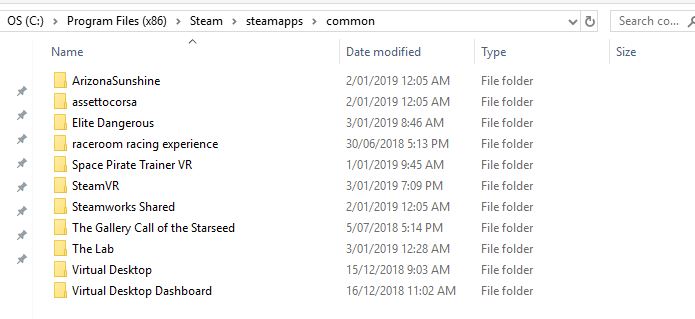
I do have the Windows Mixed Reality app installed on steam
1 Like
I just double checked my directory and I do have a “MixedRealityVRDriver” sub-folder there. Have you tried to run a search in windows for it… maybe it got installed somewhere else? You could uninstall WMR and re-install it as well.
I know this might not help your current problem but I found this document to be really good… it does offer an alternative way of finding that folder… or actually the config file in question.

5 Likes
I have the SO+ since November 9, 2018 and a screenshot of SteamVR. It’s the same Resolution like the Vive Pro (2880 x 1600 - 1440x1600 per eye)
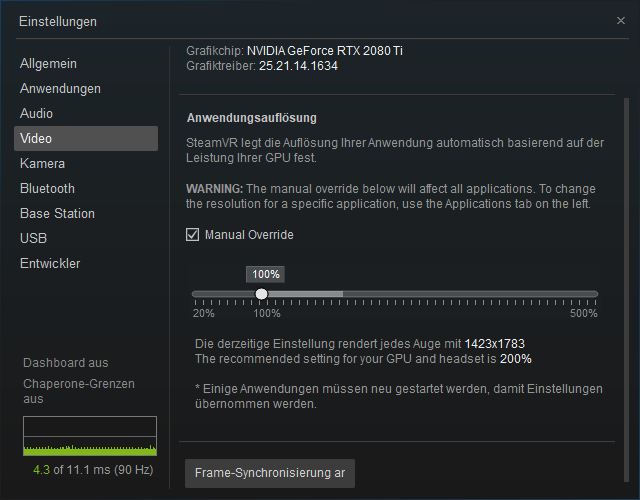
2 Likes
I tried this and didn’t notice any difference. My default SS is 200% for everything but Virtual Desktop and FO4.
Thx there was some new stuff for me as well, I’ll check it out.
2 Likes
It just probably landed somewhere else, better use windows file search if u tend to have certain folders scattered all over the place. Had to check a couple of folders myself since some look very alike.
2 Likes
I think I does make a difference but I somehow feel that the visible improvement differs from application to application. I don’t see how this is stated as placebo by some but have no clue what it exactly does either. A lot of guys where trying to get SO-dev comment on that.
1 Like
Thanks for this. Turned out the WMR app installed into my dirt rally folder. Just followed the instructions you posted then everything looked much better!!
Just spend an hour in the Lab solar system experience. Contrast and colors are stunning. Getting some good pings on the presence front. The lenses really need some work but this headset has defiantly lifted my spirits for whats ahead  SDE is near perfect

![20190104_225614|375x500]


9 Likes
Awesome work man! I mean the fixes look a bit brutal but honesty as long they do the job, cost less and if don’t intend to resell its probably the smartest move. I recommend replacing the facepad material as well since there are much more comfy ones out there.
I love the colors and black of the SO+ so much (we already know that the anti-SDE is awesome),
and I think that I will switch back from 5k to the 8k.
I’ll get wasted tonight, I’ll decide then.
Unfortunately we have no news about color calibration on the 5k+ which may be a gamble gamechanger.
Those are VERY IMPORTANT software parts with lots of impact and I absolutely don’t understand why this hasn’t been TOP priority. It’s no news…ANY display is just as good as it can be calibrated, so everything concerning the potential display quality is more or less in the dark. Experiments with eg vorpx though showed that there is still some headroom to improve. OK, you cant do that with vive and co either, It’s plain dumb if u ask me to release anything without those options.
I also love Horrorgames and with the better blacks on 8k and the brightness control the better blacks (although probably only slightly better) may a least be an acceptable experience.
I think I could live with the wobble issue since it was reported only in test-circumstance. Nobody EVER complained about a practical issue like that it ruins certain game experience. Like “can’t play duck and cover games” because of the wobble.
we’ll see…
I accept SDE to a certain amount but basically only replacing SDE with black dots seems to me like trading pest for cholera. I also “in theory” prefer a round picture even with a SDE pattern. But having the black dots “only” in certain colors and areas seems strange to me. Sometimes “hiding” flaws makes the whole thing look less good as a whole.
3 Likes