Added VR Mirror View for displaying the headset view on the desktop.
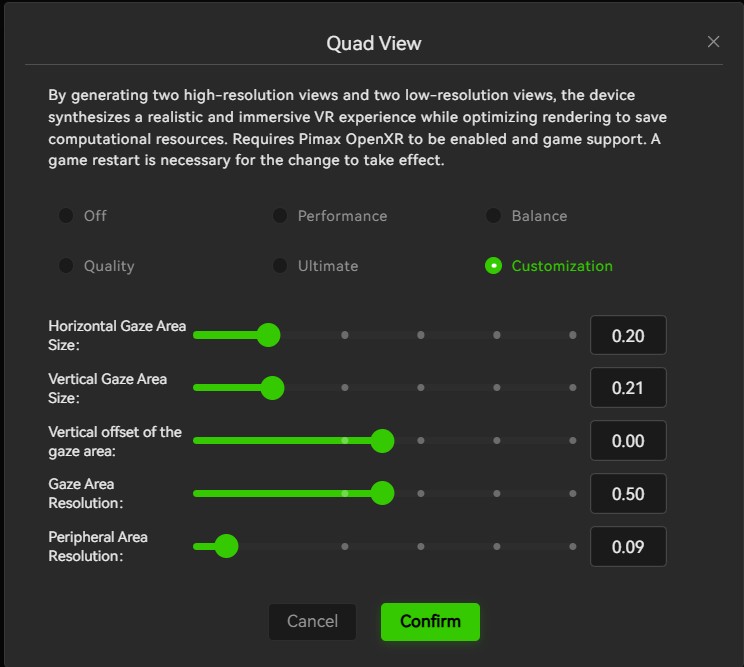
Added advanced Quad View adjustment.
Added video recording aspect ratio
Improved hand tracking algorithm.
Bug Fixes
Fixed video recording would not work on systems using integrated graphics.
Fixed mouse stuttering/lag on the PC.
Fixed an issue where the F5 key could not refresh the browser after launching Pimax EVO.
If you encounter any bugs, please leave a comment below. I’ll compile all the reports and forward them to our developers for further investigation and debugging.
If needed, I’ll also send you a DM to collect the log files for further analysis.
There are several known issues that have already been identified and are currently being addressed by our development team. These fixes are planned for the next release.
Known Issues
An “internal” tag with a white background appears in the bottom-right corner after restarting the client.
The Screen Mirror window title is displayed in English only.
The Pimax EVO environment, and Room Setup appear upside down in the VR mirror window.
Launching Screen Mirror after closing the main environment results in a black mirror window.
If Screen Mirror is activated while the headset is wake up from screen off mode, the mirrored image may occasionally appear incorrectly scaled (zoomed in or out).
After enabling or disabling QuadView, the first time dual-eye mirroring is enabled, the gap between the images may appear wider than expected.
Since installing the new version of EVO, I have been unable to get my micro oled working. It has been stuck in screen off mode, and nothing seems to work.
Tried switching back to classic and the problem persists.
Manged to start Steam VR once, but was unable to perform a room setup. Then the headset went back to screen off status and even a restart wouldn’t fix it.
I have uninstalled EVO and will return to classic 2.02 only.
I’ve been battling with same issues for weeks. Have reported it to Pimax also. Please do so too with logs so hopefully they can get to the bottom of it
Why, when activating Advanced QV in EVO and then similarly in ‘Image/Performance’ in the ‘Classic’ ‘rendering’ field, where all of the attendant /slider/adjustments appear under ‘Customization’, does the QV in the ‘Custom application configuration’ for individual applications not appear with exactly the same sliders/adjustments? i.e.
Custom application configuration:
I should at least add that I really like the look and potential functionality of the new advanced QV as it appears to come much closer to the Tallymouse companion, but can’t really test it until I can apply it to a game (in my case DCS/MSFS). I also think the Transition mode will need to be a slider rather than a fixed value, but can only opine fully when tested.
Noted. I’ve been able to reproduce this issue and have already forwarded it to our developers. They’ll investigate why the QuadView parameters aren’t being saved when trying to configure on a per-application basis.
We’ll also review the UI, as it appears to be using the old interface and should be updated.
No. It means using Sboys3 is not always easy to start.
you must activate openport and choose ‘Steam’ as runtime in pimax Evo, launch Sboys3 (if correctly installed) which should launch SteamVr, then you wait maybe 1 min or more, then you should have something appearing in your headset. If not, you must restart steamVr and wait until it appears.
Then next day you launch pimax evo, open port is on, but you forget to launch ‘sboys3’…