I used my Crystal Super headset with 5090 without any problems until a few days ago. Today, I turned my PC back on (without having done anything else in the meantime), but the headset won’t turn on, or rather, it’s not visible on PimaxPlay.
In detail:
The green light is on. I tried using different power outlets and USB ports. Unplugging and replugging them turned the light off and on again normally.
The headset is visible in Windows Device Manager.
The headset is listed among the audio sources in W11, but I can’t hear anything when I try.
Pimax Play shows the headset associated with my account, but when I go to the “device” section, everything appears to be off
The integrated graphics card is (still) disabled
Tried to reinstall nvidia, nothing change
I really don’t know what to do, I’m hoping for some help, thanks.
I also check the controllers. I activate them pushing the button and the light go green. But in Pimax Play the devices are grey, like they are off too.
Try unplug-replug cable on hmd side. I had that several times, it just sometimes refuses to work. But after several cycles of replugging, restarting and similar I got it to work eventually.
when this happens for my og I just switch the standalone switch to standalone mode - wait a few seconds and then one the loading dots appear in the headset- switch it back to pc mode
I have experienced this issue before, use DDU (Display Driver Uninstaller) to remove your Nvidia driver, and perform a clean install of the driver, strangely enough I had to also swap to the first display port of the 5090
I also helped a subscriber from the US who had the same problem
Also ensure the USB is plugged into a USB 3 port, use one on the I/O at the rear of the PC and swap ports with a working device and reboot PC for the Super to be detected
This may be not relevant since the OP has a Super, but on my OG Crystal if I run my screens at anything other than 60hz while the OG is connected it will just show a black screen in the headset and pixmax play wont detect it properly. As soon as I change the screens to 60Hz in windows display manager it works. hth
However remember that bandwidth is shared, I run a 249hz Samsung Odyssey G9 Ultrawide and 2 x 4K monitors on a 5090, I drop the resolution on the Ultrawide to 120hz to avoid any such issues when recording on the Super.
I have recently had this issue. I would just get a green light no matter what ports I was using. What I did to resolve it was remove the Unit itself from the housing and reinserted it. Making sure everything was seated correctly. Only the I got my blue light and my pc recognized my Pimax Crystal Super
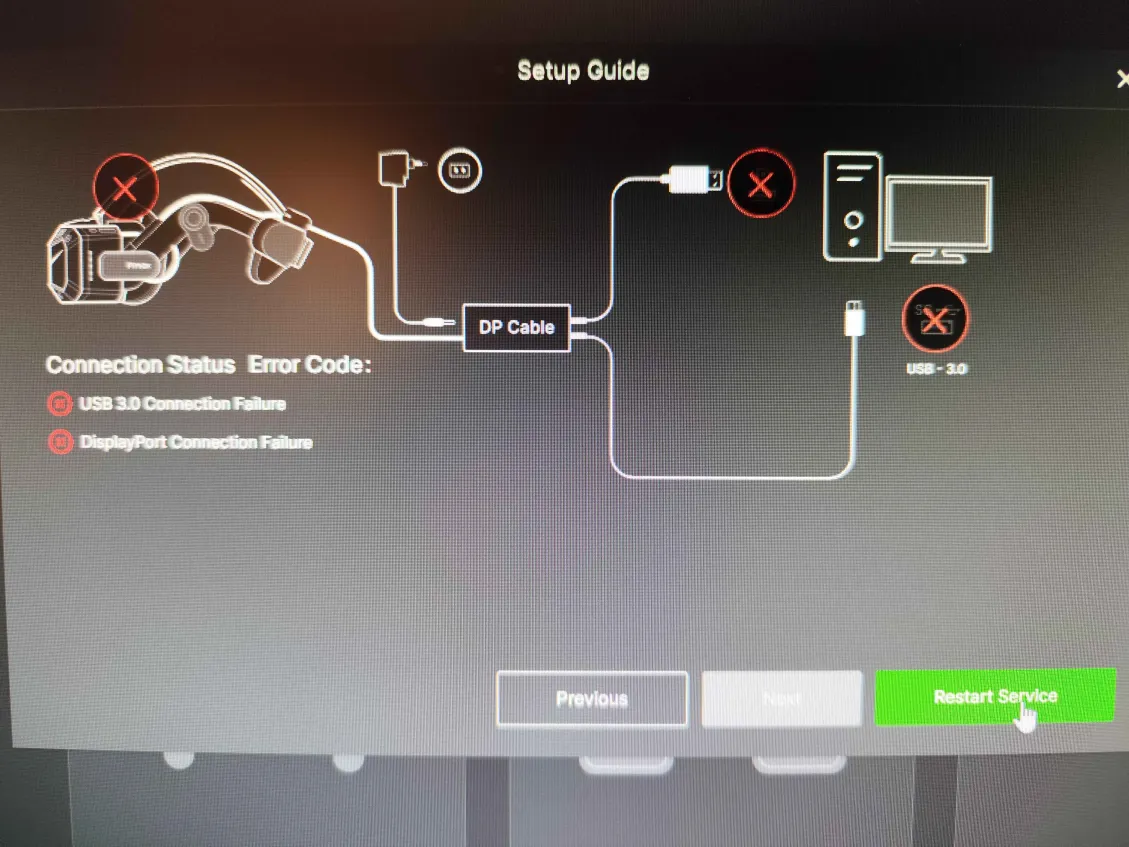
tried the Guidance function in Pimax play and I got both usb and dp connection failure, how is it possibile?
You will get all “red crosses” if your power supply is not (or barely) functioning or if it is not plugged in. Is the power LED light on the headset lighting up when you apply power to the DP/USB hub?
 hth
hth