I did see somewhere the Varjo Aero wasn’t working at all with 4090s.
Nvidia aren’t making things easy are they.
I did see somewhere the Varjo Aero wasn’t working at all with 4090s.
Nvidia aren’t making things easy are they.
Seems like that is the case. Just posted a link from Vive that also mentions Varjo had some issues as well and are currently testing a fix for there hmd.
So the question will be whether the fix comes with Nvidia drivers or if VR manufacturers will need to cater for it in firmware.
It looks like may need adjustments on both sides.
Which will of course require both parties working together.
Shouldn’t Nvidia be notifying developers of such changes??
Yes they should have. As this gives bad press for Nvidia.
Well they have plenty of that right now between prices and the 12gb 4080 debacle.
Indeed along with the 16pin power cable issues that some users have experienced melting connector.
I was surprised when I got it with how tiny the connector is. You don’t really see it in vids but it is really small. And to carry a lot of power.
There is a topic here on the issue. There are lots of possible theories on the cause. Corsair Johnyguru has a theory that the connecter may not be properly fully seated.
Gainmax if I have the name right has halted sales to change the connector from what O read.
Yea I have been careful to make sure it is firmly in and not bent or twisted. And when swapping between the 4090 and 3090 I have not been disconnecting the cable, just disconnecting the 4x PCIe that connect to it.
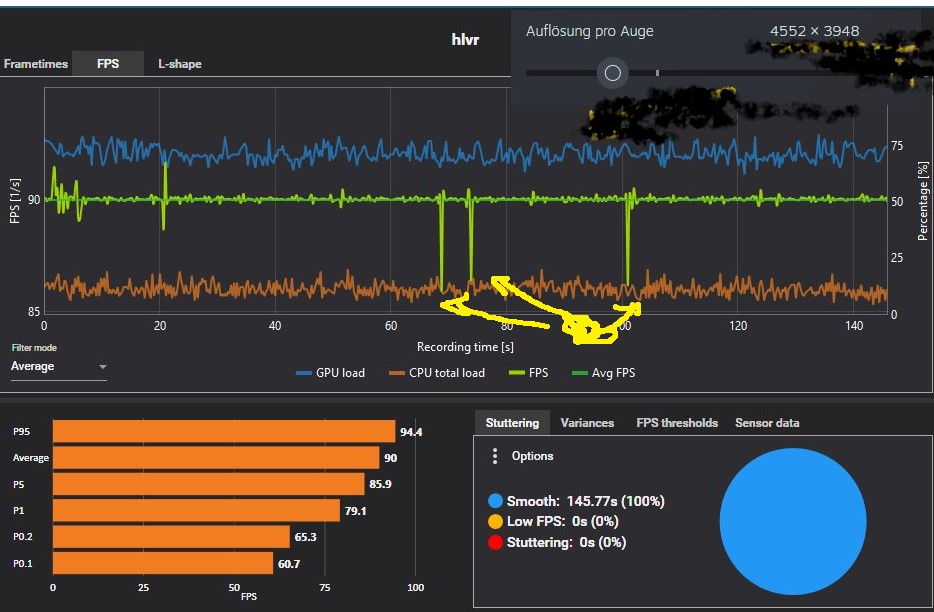
Ahhhh, did you mean latencies/drops every 50 seconds? I have that too, but only measurably. Almost impossible to see on the HMD. I actually suspected a candidate on the bus who wasn’t shoveling the data fast enough. Due to a lack of time and since it is hardly visible, I have not looked into it any further.
here it looks better
GPU-Z keeps showing Vrel max all time, when I launch steamVR…
I just made a fresh install on a 13900 KF, Z790 Rog Maximus with a Rog strix 4090 OC. I can confirm that any monitoring software is causing flickering on Pimax 8kx. I had to remove, MSI afterburner, Armor Crate, ICue, GPU Tweak III and disable Aura in BIOS before I could have a flicker free experience.
Even FPS VR with dashboard loaded in game gives the occasional stuttering. Not in all games but in many.
Hiding the dashboard in game for FPSVR helped.
I tried with each one alone to see which was causing the issue. Its all of them even if they are the only monitoring software.
I now use HWMonitor but close it before any gaming as its also causing the same issue.
I remember a similar issue when 3090 was first released till Nvidia made a driver update to resolve it.
This feedback should be used for both Nvidia and Pimax teams to sort out.
I just wanted to share my findings while troubleshooting this problem that cropped up since upgrading from RTX 3090 to 4090, that post can be read here if you have not already:
8KX, upgraded to RTX 4090 from 3090, weird lag latency that I cannot rectify.
https://www.reddit.com/r/Pimax/comments/yoc9ia/8kx_upgraded_to_rtx_4090_from_3090_weird_lag/
My troubleshooting consisted of:
The problem persisted, so having felt that I sufficiently ruled out SteamVR I pulled my HTC Vive Pro 2 out of the closet, reinstalled it’s associated software, did the fully set up to get SteamVR to recognize it, repaired the Index Controllers to it and wouldn’t you know it, THE PROBLEM EXISTS THERE AS WELL @ 120 Hz no less.
The same exact problem, moderate, nauseating latency and a frame skipping problem every 5-10 seconds (the frequency of which is reduced by closing MSI AB, fpsVR has no bearing on this).
So I did more sleuthing, using the search terms “VR Latency Lag RTX 4090” and wouldn’t you know it Varjo Aero owners are also experiencing the same problem and Varjo has even come out and acknowledged that there is a problem and that they are working on it.
Excerpt:
"On 10/14/2022 at 2:13 PM, Supmua said:So Pimax also stutters at max FOV? What’s the common denominator here, NVIDIA software?
I think the current line of thought is it’s a driver issue at high throughput..possibly DSC related. Which likely means an Nvidia fix ???
Edited October 14 by zildac "
So the problem is most definitely real, affects all headsets, and is most definitely related to the RTX 4090, most definitely implicating the display driver and possibly pertains to the way DSC (Display Stream Compression) works.
If Nvidia reps could investigate and acknowledge and open up an escalated dialog with Nvidia that would be much appreciated, as I stated in my original post, I didn’t need more raster or RT with a 3090 at 5120x144 2D, my main justification for blowing $1600 US on this upgrade was because my 3090 struggled with VR across many demanding titles. How Nvidia dropped the ball with this is beyond me.
Thanks for reading.
yeah in one of my posts above in reddit or maybe it was the vive forum. Someone said Nvidia changed things in the rendering pipeline and said they forgot to notify ppl.
So imagine Nvidia will need to work on a fix and communicate collaborate with hmd makers on what maybe needed to update there end if needed.
Update:
It’s something related to DSC because the problem is not present with my Vive Pro 2 at 90 Hz but is present at 120 Hz. With my 8KX, reducing FOV from Large to Normal does not alleviate the issue. That reducing the refresh rate on the VP2 from 120 Hz to 90 Hz tells me that this issue is related to DSC.
Also, another bizarre issue is that it doesn’t matter if I change the resolution within SteamVR to 150% or 200% the GPU load is always 35% in VR Home (5800x3600 or around here). What is bizarre is that with my VP2, with an indicated 4380x4380 (this is what it is defaulting to at 100%, actual resolution is around 2500x2500!) and GPU load is at 65% in SteamVR and I actually have to reduce settings to lower than that of the Pimax 8KX in Assetto Corsa Competizione! Rough math puts the indicated resolution of the 8KX around 18k pixels vs maybe 17k of the VP2 but the load is way higher on the VP2! I have no idea what is going on here and I’ve already completely uninstalled SteamVR twice. Not sure if this is a Pitool problem or an Nvidia display driver problem or a SteamVR problem but if I had to guess I would say that it’s an Nvidia problem because I had none of these issues before upgrading to the 4090 and that’s the only variable that has changed.
I tried to post this at r/nvidia but they took it down “Rule 1 no troubleshooting” and I an unable to submit a ticket to Nvidia (always returns “Error”). If anyone has open comms with Nvidia and can relay this problem that would be great.
MSI AB has no bearing whatsoever on this issue. It’s something related to DSC because the problem is not present with my Vive Pro 2 at 90 Hz but is present at 120 Hz. With my 8KX, reducing FOV from Large to Normal does not alleviate the issue. That reducing the refresh rate on the VP2 from 120 Hz to 90 Hz tells me that this issue is related to DSC. I can leave MSI AB enabled on my VP2 @ 90 Hz and the problem is not present.
Also, I neglected to add that my 8KX is running at 90 Hz, this is important as it has this is the determining factor as to whether or not the issue is present on my Vive Pro 2. At 120 Hz, the same identical problem, nauseating latench / lag with a frame-skip / stutter every 5-10 seconds (no corresponding frame-time spike, happens with 35% GPU load!) but at 90 Hz the issue is not present.
There is a possibility that those who say they aren’t having the problem with 8KX are at 75 Hz.
Again, reducing FOV from Large to Normal does not alleviate the problem for me. Similarly, reducing the indicated resolution from 4382x4382 to 2500x2500 on the VP2 also does not alleviate the issue. The only thing that alleviates the issue is reducing the refresh rate.
I haven’t tried reducing the refresh rate from 90 to 75 Hz on the 8KX because I’m afraid I may brick the headset as it’s quite finnicky with this setting. I’m hoping this issue is resolved quickly, in the meantime I’ve fallen back on my VP2 which has nice contrast and clarity in comparison albeit runs uncomfortably hot.